

Why Your WordPress Site Is Slow (And How to Fix It Instantly)
In the digital age, where attention spans are shorter than ever, the speed of your website can make or break your online presence. For WordPress users, site speed is not just a technical metric; it’s a crucial factor that influences user experience, search engine rankings, and ultimately, conversions. A fast-loading site can lead to higher engagement rates, lower bounce rates, and increased customer satisfaction.
Conversely, a slow site can frustrate visitors and drive them away, resulting in lost opportunities for businesses and bloggers alike. Understanding the importance of site speed is the first step toward optimizing your WordPress site. In this article, we will explore the common causes of slow loading times, how to identify speed issues, and practical strategies to enhance your site’s performance.
Whether you’re a seasoned developer or a beginner just starting with WordPress, this guide will equip you with the knowledge to ensure your website runs smoothly and efficiently.
Key Takeaways
- Slow WordPress sites are often caused by unoptimized images, poor hosting, and excessive HTTP requests.
- Identifying speed issues involves using tools to analyze site performance and pinpoint bottlenecks.
- Optimizing images, using caching plugins, and implementing CDNs significantly enhance loading times.
- Regularly cleaning the database and updating themes/plugins help maintain optimal site speed.
- Continuous monitoring and maintenance are essential for sustaining long-term WordPress site performance.
Common Causes of Slow WordPress Sites
Several factors can contribute to a sluggish WordPress site.
Many WordPress themes come packed with features that may seem appealing but can significantly slow down your site.
Similarly, plugins that are poorly coded or not optimized can add unnecessary bloat, leading to longer loading times. It’s essential to choose lightweight themes and only install plugins that are necessary for your site’s functionality. Another common culprit is unoptimized images.
High-resolution images can take up a lot of bandwidth and slow down your site’s loading speed. If you’re using large images without proper compression or resizing, you’re likely to experience delays in loading times. Additionally, external scripts and resources, such as ads or social media widgets, can also contribute to slower speeds by increasing the number of requests made to load your page. You can Get My Service Now to enhance your project with professional expertise.
How to Identify the Speed Issues on Your WordPress Site
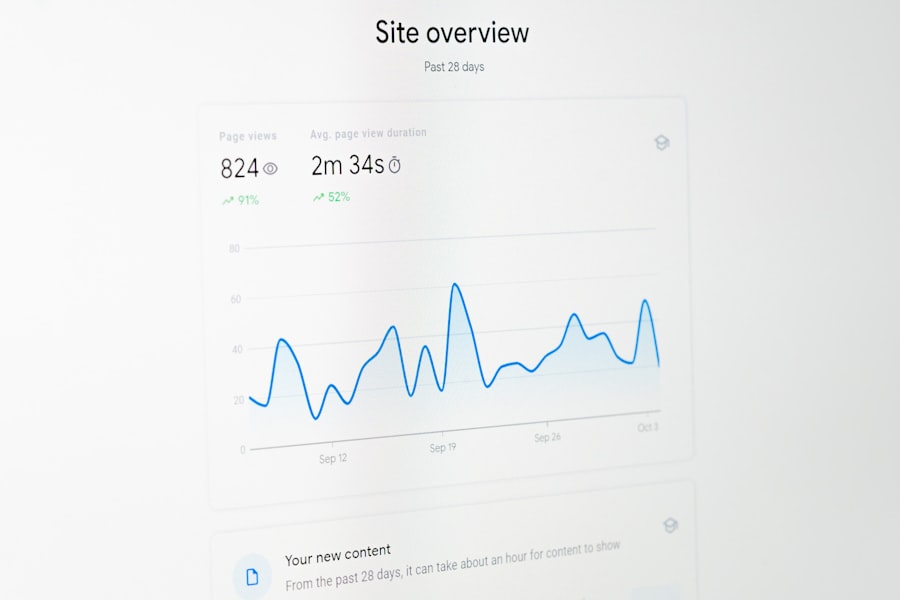
Before you can improve your site’s speed, you need to identify where the problems lie. There are several tools available that can help you analyze your website’s performance. Google PageSpeed Insights is one of the most popular options; it provides detailed insights into your site’s loading speed and offers suggestions for improvement.
Another excellent tool is GTmetrix, which not only measures your site’s speed but also breaks down the various elements that contribute to loading times. When using these tools, pay attention to key metrics such as Time to First Byte (TTFB), fully loaded time, and the number of requests made. These metrics will give you a clearer picture of how your site performs under different conditions.
Additionally, consider running tests on different devices and network speeds to understand how your site performs for various users. This comprehensive analysis will help you pinpoint specific areas that need attention.
Optimizing Images for Faster Loading Times
Images are often the largest files on a webpage, making them a significant factor in loading speed. To optimize images for faster loading times, start by resizing them to the dimensions they will be displayed on your site. There’s no need to upload a massive image if it will only be shown as a thumbnail.
Use image editing software or online tools to adjust the size before uploading. Next, consider compressing your images without sacrificing quality. Tools like TinyPNG or ImageOptim can significantly reduce file sizes while maintaining visual integrity.
Additionally, using the right file format is crucial; JPEGs are ideal for photographs, while PNGs work better for graphics with fewer colors. Implementing these strategies will not only enhance your site’s speed but also improve user experience by ensuring images load quickly.
Choosing the Right Hosting Provider for Your WordPress Site
| Cause of Slow WordPress Site | Impact on Load Time | How to Fix Instantly | Estimated Improvement |
|---|---|---|---|
| Unoptimized Images | Increases page size by up to 50% | Compress images using plugins like Smush or ShortPixel | Load time reduced by 30-50% |
| Too Many Plugins | Causes slow server response and conflicts | Deactivate and delete unnecessary plugins | Load time improved by 20-40% |
| No Caching Enabled | Every page loads dynamically, increasing load time | Install caching plugins like WP Rocket or W3 Total Cache | Load time reduced by 40-60% |
| Slow Hosting Server | High Time To First Byte (TTFB) | Upgrade to a faster hosting provider or plan | Load time improved by 30-70% |
| Excessive External Scripts | Delays page rendering | Limit or defer loading of external scripts | Load time reduced by 10-30% |
| Unminified CSS and JavaScript | Increases file size and load time | Minify CSS and JS files using plugins or tools | Load time improved by 15-35% |
The choice of hosting provider plays a pivotal role in your WordPress site’s performance. Shared hosting may be cost-effective, but it often leads to slower speeds due to resource sharing among multiple sites. For better performance, consider investing in managed WordPress hosting or VPS (Virtual Private Server) hosting.
These options provide dedicated resources and optimized environments specifically designed for WordPress. When selecting a hosting provider, look for features such as server location, uptime guarantees, and customer support. A hosting provider with servers closer to your target audience can significantly reduce loading times.
Additionally, ensure that they offer scalability options so that as your site grows, your hosting can accommodate increased traffic without compromising speed.
Utilizing Caching Plugins to Improve Site Speed

Caching is one of the most effective ways to enhance your WordPress site’s speed. When a user visits your site, caching plugins create static versions of your pages and store them temporarily. This means that when subsequent visitors access the same page, they receive the cached version instead of generating it from scratch each time, which saves time and server resources.
Popular caching plugins like W3 Total Cache and WP Super Cache are user-friendly and offer various settings to optimize performance further. By enabling features such as browser caching and page caching, you can significantly reduce loading times and improve overall user experience. Remember to regularly clear your cache to ensure that visitors see the most up-to-date content.
Minimizing HTTP Requests for Quicker Loading
Every element on a webpage—images, scripts, stylesheets—requires an HTTP request to load. The more requests made, the longer it takes for a page to load fully.
Combine CSS and JavaScript files where possible; this reduces the number of requests needed to load these resources. Additionally, consider using CSS sprites for images that appear multiple times on your site. A CSS sprite combines several images into one file, allowing you to load them all with a single request.
This technique not only speeds up loading times but also reduces server load, contributing to an overall smoother experience for users.
Implementing Content Delivery Networks (CDNs) for Faster Loading Times
A Content Delivery Network (CDN) is a network of servers distributed across various locations worldwide that store copies of your website’s static content. When a user accesses your site, the CDN serves the content from the server closest to them, significantly reducing loading times. This is especially beneficial for sites with a global audience.
Integrating a CDN into your WordPress site is relatively straightforward with services like Cloudflare or StackPath. These platforms offer easy setup processes and provide additional security features such as DDoS protection and SSL certificates. By leveraging a CDN, you not only enhance loading speeds but also improve reliability during traffic spikes.
Cleaning Up Your WordPress Database for Improved Performance
Over time, your WordPress database can accumulate unnecessary data such as post revisions, spam comments, and transient options that can slow down your site. Regularly cleaning up your database is essential for maintaining optimal performance. Plugins like WP-Optimize or Advanced Database Cleaner can help automate this process by removing unwanted data safely.
In addition to cleaning up unnecessary data, consider optimizing database tables regularly. This process helps improve efficiency by reorganizing data storage within the database. A well-maintained database ensures that queries run faster and contributes to an overall smoother experience for users visiting your site.
Updating and Optimizing Your WordPress Theme and Plugins
Keeping your WordPress theme and plugins updated is crucial for both security and performance reasons. Developers frequently release updates that not only fix bugs but also optimize code for better performance. Regularly check for updates in your WordPress dashboard and apply them promptly.
Moreover, consider reviewing the plugins you have installed periodically. Deactivate and delete any plugins that are no longer necessary or that duplicate functionality provided by other plugins or your theme itself. This practice helps reduce bloat on your site and ensures that only essential components are running, contributing to faster loading times.
Monitoring and Maintaining Your WordPress Site Speed for Long-Term Success
Improving your WordPress site’s speed is not a one-time task; it requires ongoing monitoring and maintenance. Regularly test your site’s performance using tools like Google PageSpeed Insights or GTmetrix to identify any new issues that may arise as you add content or features over time. Additionally, establish a routine for checking updates for themes and plugins while also cleaning up your database periodically.
By staying proactive about maintenance and optimization efforts, you can ensure that your WordPress site remains fast and efficient in the long run, providing an excellent experience for all visitors. In conclusion, optimizing your WordPress site speed involves understanding common issues, implementing effective strategies like image optimization and caching, choosing the right hosting provider, and maintaining ongoing monitoring practices. By following these guidelines, you’ll create a faster website that enhances user experience and drives better results for your online presence.
If you’re looking to enhance the performance of your WordPress site, you might also find it beneficial to explore the latest web design trends that can impact site speed and user experience. Check out this article on the
; border: none; border-radius: 5px; box-shadow: rgb(43, 0, 184) 0px 2px 0px; cursor: pointer; transition: 0.1s; display: block; margin: 0px auto; max-width: 150px; text-align: center; text-decoration: none;" target="_blank" rel="noopener">Hire Me Now</a></p>
<p></p>
<h2>FAQs</h2>
<p></p>
<h3>Why is my WordPress site loading slowly?</h3>
<p>Common reasons for a slow WordPress site include large image files, excessive plugins, poor web hosting, unoptimized databases, and lack of caching.</p>
<h3>How can I check the speed of my WordPress site?</h3>
<p>You can use tools like Google PageSpeed Insights, GTmetrix, or Pingdom to analyze your site’s loading speed and get recommendations for improvement.</p>
<h3>Does web hosting affect WordPress site speed?</h3>
<p>Yes, the quality and type of web hosting significantly impact site speed. Shared hosting can be slower, while VPS or dedicated hosting typically offers better performance.</p>
<h3>Can too many plugins slow down my WordPress site?</h3>
<p>Yes, having too many plugins or poorly coded plugins can increase load times and reduce site performance.</p>
<h3>How does image optimization improve WordPress speed?</h3>
<p>Optimizing images by compressing them and using appropriate formats reduces file size, which decreases loading times and improves overall site speed.</p>
<h3>What is caching and how does it help speed up my WordPress site?</h3>
<p>Caching stores static versions of your pages, reducing server processing time and speeding up page delivery to visitors.</p>
<h3>Is it necessary to update WordPress and plugins for better speed?</h3>
<p>Yes, keeping WordPress core, themes, and plugins updated ensures you have the latest performance improvements and security fixes.</p>
<h3>Can a content delivery network (CDN) improve my WordPress site speed?</h3>
<p>Yes, a CDN distributes your site’s content across multiple servers worldwide, reducing latency and speeding up load times for global visitors.</p>
<h3>How does database optimization affect WordPress performance?</h3>
<p>Regularly cleaning and optimizing your WordPress database removes unnecessary data, which can improve query speed and overall site performance.</p>
<h3>What immediate steps can I take to fix a slow WordPress site?</h3>
<p>Immediate fixes include enabling caching, optimizing images, disabling or removing unnecessary plugins, and switching to a faster hosting provider.</p>
</div></div></div></div><div class="post-tags share"><div class="social"><h4>Share:</h4><ul><li><a class="facebook" href="https://www.facebook.com/sharer/sharer.php?u=https://blog.riyadulpias.com/why-your-wordpress-site-is-slow-and-how-to-fix-it-instantly/" target="_blank"><i class="fab fa-facebook-f"></i></a></li><li><a class="twitter" href="https://twitter.com/share?text=Why%20Your%20WordPress%20Site%20Is%20Slow%20(And%20How%20to%20Fix%20It%20Instantly)&url=https://blog.riyadulpias.com/why-your-wordpress-site-is-slow-and-how-to-fix-it-instantly/" target="_blank"><i class="fab fa-twitter"></i></a></li><li><a class="pinterest" href="http://pinterest.com/pin/create/link/?url=https://blog.riyadulpias.com/why-your-wordpress-site-is-slow-and-how-to-fix-it-instantly/&media=https://blog.riyadulpias.com/wp-content/uploads/2025/12/image-16.jpg&description=Why%20Your%20WordPress%20Site%20Is%20Slow%20(And%20How%20to%20Fix%20It%20Instantly)" target="_blank"><i class="fab fa-pinterest-p"></i></a></li><li><a class="linkedin" href="https://www.linkedin.com/shareArticle?mini=true&url=https://blog.riyadulpias.com/why-your-wordpress-site-is-slow-and-how-to-fix-it-instantly/&title=Why%20Your%20WordPress%20Site%20Is%20Slow%20(And%20How%20to%20Fix%20It%20Instantly)" target="_blank"><i class="fab fa-linkedin-in"></i></a></li></ul><!-- End Social Share --></div></div><div class="post-pagi-area"><div class="post-previous"><a href="https://blog.riyadulpias.com/rank-math-vs-yoast-seo-the-2025-showdown/"><div class="icon"><i class="fas fa-angle-double-left"></i></div><div class="nav-title"> Previus Post<h5>Rank Math</h5></div></a></div><div class="post-next"><a href="https://blog.riyadulpias.com/7-hidden-elementor-tricks-that-will-save-you-hours-of-design-time/"><div class="nav-title">Next Post <h5>7 Hidden</h5></div> <div class="icon"><i class="fas fa-angle-double-right"></i></div></a></div></div>
<div class="comments-area">
<div class="comments-form">
<div id="respond" class="comment-respond">
<h3 id="reply-title" class="comment-reply-title"><div class="title"><h4>Leave a comment</h4></div> <small><a rel="nofollow" id="cancel-comment-reply-link" href="/why-your-wordpress-site-is-slow-and-how-to-fix-it-instantly/#respond" style="display:none;">Cancel reply</a></small></h3><form action="https://blog.riyadulpias.com/wp-comments-post.php" method="post" id="commentform" class="comment-form"><div class="row"><div class="col-md-12"><div class="form-group comments">
<textarea class="form-control" name="comment" id="comment" cols="90" rows="8" placeholder=" Comment" aria-required=)